
The Functions.ini is no longer be needed. The functions and settings from the functions.ini file are now stored in the MSaleDataSQL database.
Importing the functions for existing or new sites
- When upgrading an existing site to to use the functions file in a new installation, import the functions.ini by going to Managers Menu > Register Setup > Terminal Configuration > Register Options > Email-Export-INI > Import Misc. Functions
-
In the open window, browse to the *ini file you you need to import.
-
For a new file, browse to the “INI File List” folder, and to use an existing one (to import existing settings from a used INI file), browse to the “INI files” folder. Click on the appropriate INI file and then Save.
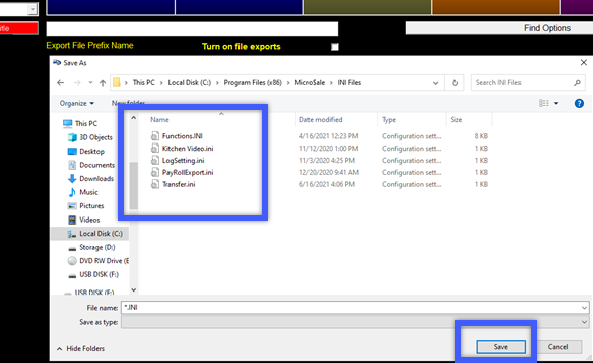
-
To access the database and make changes or add functions:
To access the functions area to make changes:
-
-
- Managers Menu > Register Setup > Terminal Configuration > Register Options > Email-Export-INI > Misc Functions
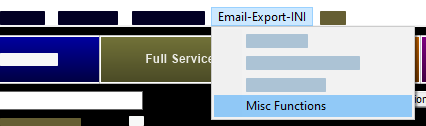
- Managers Menu > Register Setup > Terminal Configuration > Register Options > Email-Export-INI > Misc Functions
-
To make a setting change to one of the items found in the Misc Functions:
- Click the “Options Sections” drop-down menu at the top of the window to select the desired function section. In the example, “Bar Codes”, this populates all settings found under that category.
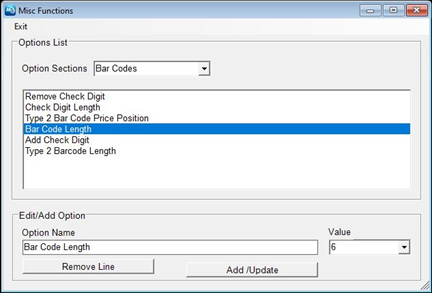
- Select the setting you wish to alter. For example, “Bar Code Length”, populates the “Option Name” and Value” fields:
- Most of the settings use the value of “Enabled” or “Disabled”
- For settings such as “Bar Code Length”, simply type in the value you wish to use. In this example, the bar code length is "6" characters.
- After your setting change has been made, click on “Add/Update” to save the changes.
To remove a setting, click on the desired line (such as Bar Code Length) and then select "Remove Line". If you inadvertently delete a line that is needed, you can either reimport the INI file, or open the functions ini file outside of MicroSale and then retype the line under "Option Name" and then "Add/Update" to save.