
The Daily Audit Report is the most commonly used report in MicroSale. It is a daily breakdown of a day’s sales by various areas. The report allows management and operators to analyze a daily recap of sales with comparisons to last year, labor, and forms of payment in a quick snapshot view.
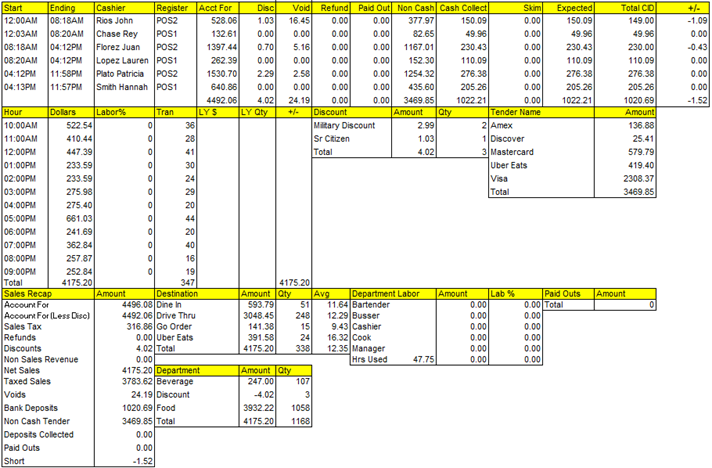
Audits (top section) – quick service only
The audits section is a summary of each of the employee’s cashier audits for the day. For a fully detailed, breakdown of each audit, you can go to the Cashier Audit report.

| Term | Description |
|
Start/Ending |
This is the start and ending time of the audit |
|
Cashier |
Employee assigned to the audit |
| Register |
Terminal name/number assigned to the audit |
| Acct For |
Total revenue for the assigned audit Non Cash+ Cash Collected+ Paid Outs+ Tax This does not include Discounts, Refunds, or Voids |
| Non Cash |
Credit cards, gift cards, and any other noncash tender used in the system (Uber Eats, GrubHub, etc). |
Cash Collected |
Total that should be in the drawer; excluding the beginning drawer amount. |
| Skim |
If the drawer was skimmed (meaning excessive cash was removed from the drawer prior to closing the audit), this number is subtracted from the Cash Collected |
| Expected |
This total is affected by the Skim amount. For example, if Cash Collected is $100.00 and $20.00 is skimmed, the Expected total would be $80.00. When the drawer is NOT skimmed, the Expected total will match Cash Collected. |
| Actual CID |
Total of the “actual” count of money in the drawer. +/- (Over/Short): Actual CID-Cash Collected= +/- OR Actual CID- (Expected+Skim). Excluding beginning drawer amount. |
Consolidated Audit Report
For a date range report of audits, use the Audit History Report (or Assigned Drawer depending on configuration). This report generates data from closed days (historical sales) and provides a list of audit information on individual employees. The Audit History gives concentrated information on individual employees’ audits.