
A void is typically used to delete an item or check that assumingly has not been made. A discount is used on items that have been made or delivered. A void reenters an item back into inventory where a discount removes it from inventory.
It is important to properly mark voids and discounts, as it affects your gross sales. Discounts are tracked as deliverable sales while a void marks the sale as never happening. You can track each void and discount to ensure your staff and management are properly accounting for the transactions.
Most of your reports in MicroSale summarize a list of all discounts and voids used. This section provides additional details to further track the activity. For additional investigation, use the Transaction Review to view check details in entirety.
Current Week Voids
Void History
Current Week Discounts
Discount History
Voids
Current Week Voids Report
- Managers Menu > Reports Menu > Current Week Voids
The Current week void report is a date range report that generates a log of voids used within the current week (since the last weekly closeout). It lists pertinent check details such as the employee name, manager approval, date, check number, menu items voids, reason, amount and void time. If you need to further research this transaction, you can use Transaction Review to view all details of each check.
To view voids for previously closed days, use the Void Report.
Void Report
- Managers Menu > Reports Menu > Voided Sales
The Void Report is generated from closes sales (historical reports). This report is also accessible from the Daily Sales Summary screen under Misc History.
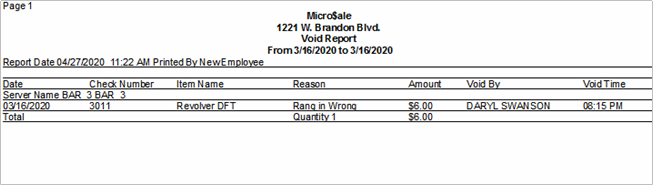
The Void History Report is generated from closed sales (historical data). The Voids Report provides information and detail pertaining to the selected date range. It lists pertinent check details such as the employee name, manager approval, date, check number, menu items voids, reason, and amount. To investigate further, search Voids in Transaction Review.
In full service environments, two additional void reports are available; Voids Today by Department and Voids Today by Detail. Please click here to view.
Discounts
Current Week Discounts
- Managers Menu > Reports Menu > Current Week Discounts
The Current week discount report is a date range report that generates a log of discounts used within the current week (since the last weekly closeout).
The report itemized a list of discounts used, the employee who was assigned to the transaction, the manager who approved the discounts, the amount and check number. If you need to further research this transaction, you can use Transaction Review to view all details of each check.
To view discounts for previously closed days, use the Discounts Report below.
Discount History
- Managers Menu > Reports Menu > Discounts
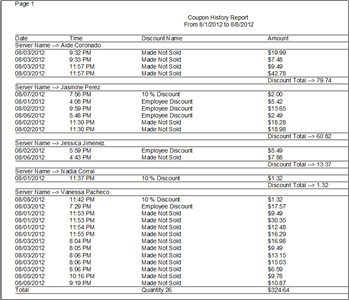
This report is generated from closed sales data (historical sales). The report is useful when you are interested in seeing where discounts are being applied. It displays the date, time the discount was taken, the employee’s audit, discount name or typed reason, and the amount.
A summarized variation of the Discounts Report is available in the Reports Menu > Daily Sales Summary > Misc History > Discounts