
The Balance Sheet is populated from Historical Data. The report can be chosen for a single day or selected date range of closed days. The balance sheet is used to compare the products sold (Total Revenue) and the payments collected (Total Accounted).
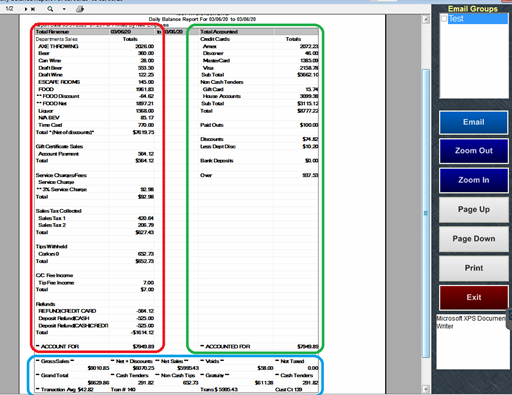
How the balance sheet works
- The left side (product sold) is the gross sales. Gross Sales are defined as the total amount of revenue brought in, before adjusting for discounts, voids, and refunds. Taxes are not included in this amount. Gross Sales is an important figure, but a more accurate representation of your top-line is the Net Sales amount.
- The right side (payments) is the non-cash tenders total plus the discounts total plus the expected cash deposit total which equals the accounted for total
- The total cash tenders minus the non-cash tips minus gratuity equals cash less tips which is also the expected cash deposit amount. This information is located towards the bottom of the balance sheet.
- In summary, take the non-cash tenders total, which includes sales tax and tips and add the discounts, plus the expected cash total (which already has the non-cash tips and gratuities deducted) which equals the accounted for total
How to analyze the balance sheet
| Term | Description |
| Gross Sales |
Gross Sales are defined as the total amount of revenue brought in (including non-sales revenue), before adjusting for discounts, voids, and refunds. This figure does not include taxes. |
| Net Sales |
Net Sales is a more accurate representation of your top-line. Its your sales after adjusting for discounts, voids and service charges. (excluding tax) Net Sales = Gross sales – discounts – voids – refunds – non-sales revenue |
| Non-sales Revenue | Non-sales revenue is payment collected in advance for a good/service and service charges. These are gift cards sold, payment deposits (for a preorder or event), service charges, delivery fees, and gratuity added to checks (as a service charge). |
| Account For | This number makes up all of your sales transactions. It includes discounts, service charges and tax. Does not include voids. |
| Accounted For | This number accounts for the ‘account for’ sales. |
| Cash to Account for | Actual cash amount that you should have on hand; after claimed tips are removed |
| Grand Total | Net Sales + Sales Tax + Non Sales Revenue |
| Accounted For Total | All noncash tenders, plus taxes and tips, plus discounts plus expected cash total (already has noncash tips and service charges deducted). |
| Adjusted Gross | Net sales + Non Sales Rev + Net Sales Tax + Liquor Tax + Tip Fee Income. Gratuity is included by configuration. |
| Bank Deposits | Deposits are physically counted cash amounts from cash drawers and then entered into the system. This amount should be your expected cash amount. If the number entered is higher or lower than the expected cash, reports show an over/short value. |
| Gratuity | A gratuity is automatically or manually added to a check before the customer pays. This is a service charge; and not a regular tip. Gratuity automatically added to checks. (Example: an auto 18% Gratuity on a party or a server adding in a Gratuity to a customer’s bill) |
Total Revenue (left side) of Products Sold
Net Sales = Gross sales – discounts – voids – gratuity (service charge gratuities)
Gross Sales = Net Sales + Discounts + Voids + Refunds + Non Sales Revenue (excludes sales tax)
Adjusted Gross = Net Sales + Non Sales Revenue + Tax + Tip Fee Income + Service Charges
Grand Total = Net sales + Tax + Non Sales Revenue
Subtract non-cash tenders get the expected cash deposit amount
Over/short for the bank deposit is a negative number if the expected cash deposit is not entered or if the inputted number is different than the expected. There can also be an overage if there was not enough cash collected to cover the non-cash tips or gratuities.
The Total Accounted side (right side) itemizes revenue sources;
- Credit card tenders
- Non-cash tenders (gift cards redeemed, third-party delivery tender types used)
- Discounts
- Paid Outs
- Bank Deposits; (cash) how much cash you entered
An OVERAGE is a surplus of Cash; it needs to be removed from the Accounted For) An overage showing without a deposit being entered means that there was not enough cash collected from sales to cover the non-cash tips and gratuities
Labor: itemized by job title and labor dollars spent (based on entered pay rates). The labor percentage is the labor dollar amount divided by net sales
| Account for Total Revenue Formula |
| Total Department Sales |
| + Sales Tax Collected |
| -Refunds |
| = Account for Total Revenue |