
In most restaurants, advanced modifier functionality is unnecessary. However, in some cases, you may need to use the special functions to solve an issue with a complex menu.
Required
Required vs. Mandatory… what’s the difference?
A mandatory checkbox will force the user to touch a modifier before exiting the modifier screen. The Required function enables the user to continue ringing in multiple items without interrupting the customer. Before the user tenders the order, it will remind them that you are missing criteria that is required before the order can be completed.
QUICK SERVICE ONLY; USING THE SKIP REGISTER OPTION
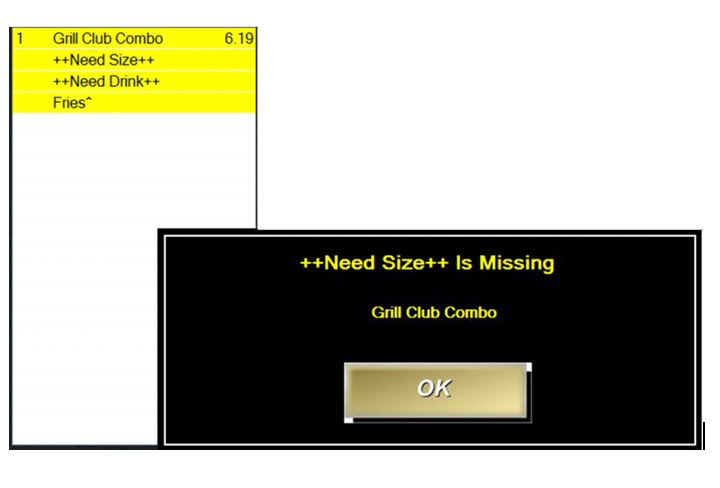
Step-by-Step Instructions
- Type in a modifier title and choose Required for the Department/Function
- You MUST have a Default Modifier Nam The Default Modifier Name will be a short instruction, such as MISSING DRINK or MISSING SIDE
Since the Default Modifier Name is not a choice in the modifier list such as Coke, Diet Coke, Sprite, etc., MicroSale will know that a choice was not actually picked. (Refers to the above picture after touching Pay Order). When you press OK, it will link you back to the modifier screen(s) that needs a selection.
- Check Mandatory so that MicroSale knows that one of the choices must be selected before tendering
Stack
This function allows two prefixes to go on the same line. For example, you can choose Wings, XC and XWET, (XC and XWET set as prefixes). This will allow all 3 words to be on the same line on the virtual check and printed receipt.
Step-by-Step Instructions
- Type in a Modifier Title
- Choose Stack in the Department/Function
- Add prefixes in the modifier group, such as !XC or !XWET
- Add in the modifier names such as Mild, Medium, BBQ, etc.
- When you are done, select Save