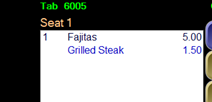
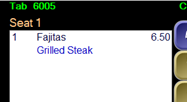
Option 1:
Setting the option globally for all items on your system
Manager Menu > Terminal Configuration > Register Options > Printing / Cash Drawer > enable the option, "Roll Price Into Menu Item".
NOTE: The price rolls into the main item on the guest receipt. The software user will see the upcharge itemized next to the modifier choice.
When using this option, you also can exclude specific modifier groups from rolling the price into the item.
To exclude specific modifier groups:
Managers Menu > Menu Maintenance > Menu Modifiers > Select your desired modifier group; enable the option "Disable Price Roll Up" > Save.
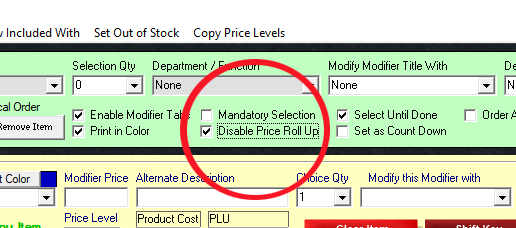
Option 2:
Setting the option by individual modifier groups
The department/function Price Adjust enables the modifier group to ‘roll’ or ‘sum’ the price of the modifiers into the menu item that the modifier group is attached with. While there is a register option to “Roll Price into Main Item”, in some cases, you may not want this option set on every modifier screen.
The Price Adjust function is useful when you do not want your guests to see an itemized upcharge next to a modifier choice. Examples such as “Grilled Steak $1.50” or “Shrimp $4.00”.
NOTE: The price rolls into the main item on the guest receipt as well as the virtual check on the order screen.
|
Regular Modifier Function |
Using Price Adjust Function |