
You have the ability to control how modifiers are sorted on the POS and on the kitchen/bar printers. Modifiers can be sorted in the order that they are entered or sorted by the placement on the buttons (how they are sorted in the modifiers setup area). The option, Order As Programmed, sorts modifiers as they are programmed in the modifier setup area.
Order as Programmed: modifiers re-sort and regroup to the same placement as they appear in the modifier setup area.
Manager Menu > Menu Maintenance > Modifier Setup
When is Order As Programmed helpful?
Order as Programmed is helpful when you need to keep modifier names or modifier groups in a specific order.
Example
2 Large Cheese Pizzas
You can select any modifier group in any order, and the selected modifiers reorganize in the order that the groups are assigned to the menu item, as well as how the modifier names are organized on the buttons.
When it’s not helpful
Order as Programmed regroups and reorganizes the modifiers, so if you are modifying modifiers, the modifiers will not stay with the appropriate modifier name because the modifiers will re-sort and regroup with their respective assigned placement.
Example
If you have a side salad modifier that is modified by “Salad Mods”, the salad mods will not go directly under the side salad modifier name.
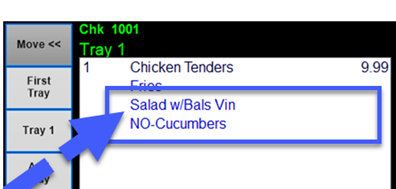
ref: “Modifiers are getting jumbled on the virtual check and not going in the order I am entering them”