
You can attach completely new, independent checks on an occupied table. This feature is perfect for large communal tables or large parties where customers are coming and going with multiple servers sharing the party. Rather than starting new seats on one ticket, this feature eliminates confusion and makes it significantly easier to add and close tickets for groups paying separately.
This feature is used to allow multiple, independent checks on one table
- Login with your employee number and go to the table layout
- Start a check regularly
- To add an additional check to an occupied table, select Add Check to Table. It will prompt you to choose a table
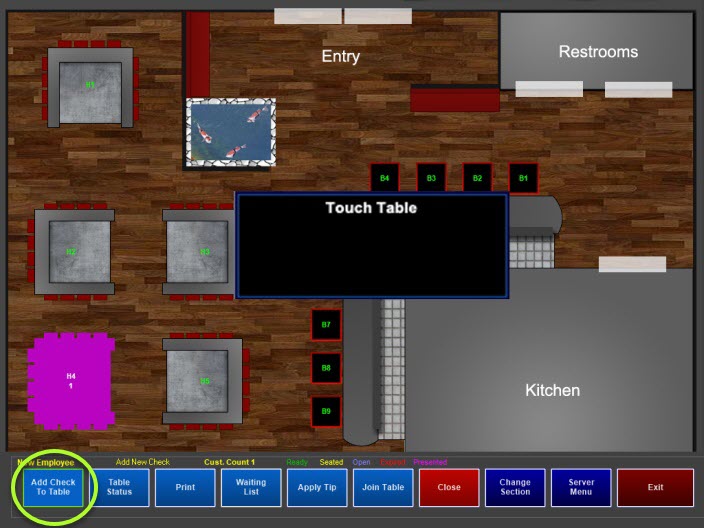
- Select the appropriate table.
-
Enter items on the new check regularly
-
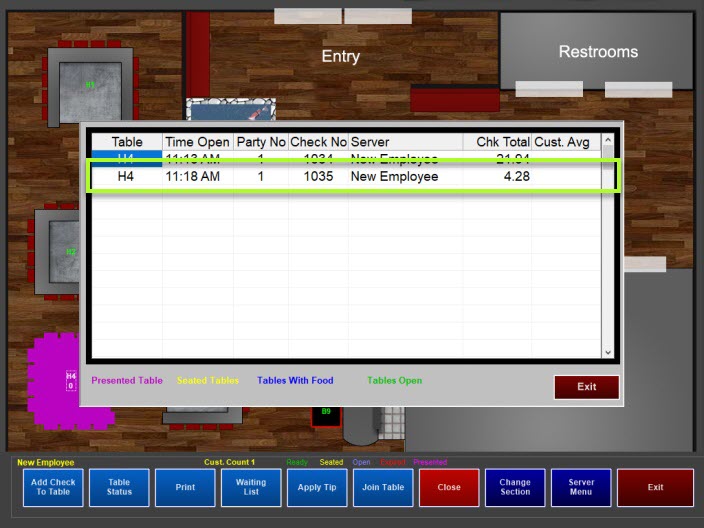
To access the additional check(s), touch the table. It will prompt you to choose a check. Touch anywhere in the row to access the check. You can add, edit and close the check(s) regularly.
To use this feature, you must enable the register setting:
This feature is available in Full Service using the Table Layout. You will need to enable this on each register using the table layout.
- Managers Menu > Register Setup > Terminal Configuration > Full Service > tick the option Allow more than 1 check per table (table screen only) > Finished With Section > Save
After the setting is enabled, Add Check to Table appears on the table layout screen.