All of the Instructions below need to be followed on all registers at each location to provide the customer with the most secure environment for the POS.
AntiVirus:
- Install and update Avast Free Antivirus, Microsoft Security Essentials, or the AV software of your choosing. Set AV to auto-scan once a week. Sunday 4 am. Also set Av to keep logs for 180 (limited disk space) days instead of 30. Confirm AV is set to update virus definitions automatically.
- Install and update MalwareBytes. Can be file transferred or downloaded directly from MalwareBytes website. http://www.malwarebytes.org/mwb-download/
Windows Programs/Services:
- Click Start > Control Panel > Add/Remove Programs.
- Select UltraVNC and Uninstall if it is installed.
- Right Click on “My Computer” and select “Manage”. Go to Services and find “Telnet”. Right Click on Telnet and go to properties. Change Startup Type from “Automatic” to “Disabled”. Touch the “stop” button to stop the service. Apply settings and exit.
- While in “Computer Management” got o “Event Viewer”.
- Right Click on “application” and select properties. Change maximum log size to 50 mb or closest 64k increment. Select radio dial “Overwrite events as needed”.
- Right Click on “security” and select properties. Change maximum log size to 50 mb or closest 64k increment. Select radio dial “Overwrite events older than__”, and enter 90 in the number of days field.
- Make sure Windows is set to download and Install updates daily at 3:00 AM.
Windows User Acct:
- Click Start > Run > type control userpasswords2 and click “OK”
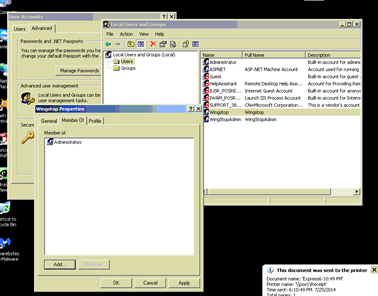
- Click on the advanced tab > followed by the “Users” folder > Select User “xxxxxxx” (POS User Account)
- Click on the Member Of tab and remove “Administrators” and add “Power Users”
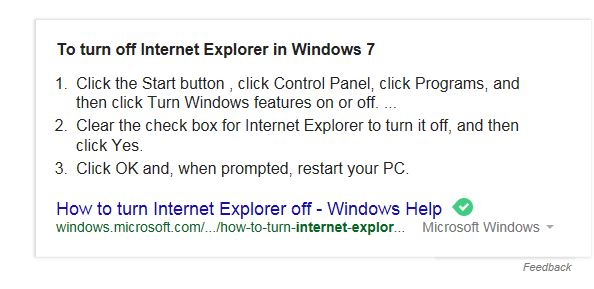
Disable Internet Explorer:
Manually Editing The Registry To Disable USB Storage Devices:
As you should always do, back your registry up before making any changes.
- Go to Start -> Run -> Type regeditand hit Enter or click on the OK button. For Vista and 7 go to Start -> type regedit into the search box, press Enter.
- Browse to:
HKEY_LOCAL_MACHINE\SYSTEM\CurrentControlSet\Services\UsbStor
Look for the value “Start” in the right hand pane.
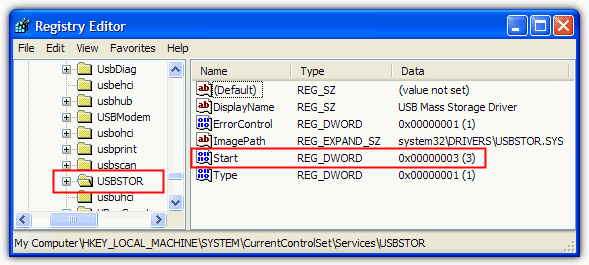
- Double click the “Start” value in regedit and the default value data should be 3.
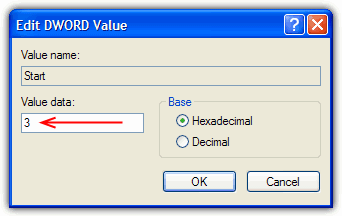
Switch this value data to 4, and USB storage devices are disabled.
Switch this value data back to 3, and USB storage devices are enabled again
SSL and TSL for Secure Internet Protocols:
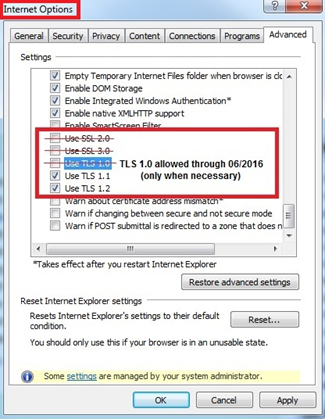
You should ensure that SSL (all versions) and TLS 1.0 have been disabled and TLS 1.1 and TLS 1.2 have been enabled (see screenshot). The former protocols are no longer secure or compliant. You may need to upgrade Internet Explorer to version 9 or higher in order to configure these settings.