
While you may simply want to create a modifier with an upcharge or ring in the item twice, below are several alternatives for ringing in liquor doubles, rocks and upcharges.
There are a few ways to build doubles in MicroSale.
In several third-party inventory programs, it may be difficult to count modifiers correctly when inventorying liquor. The Prefix (or Suffix) function enables a menu item to transform into a new item on the customer’s check and in all reports. For example, if a user rings in Captain Morgan and using the modifier, Rocks, the new item will appear as Captain Morgan Rocks with the upcharge included in the regular price.
For this function to work correctly, the modifier group must prompt immediately following the menu item (meaning, leave the Optional Modifier box Unchecked).
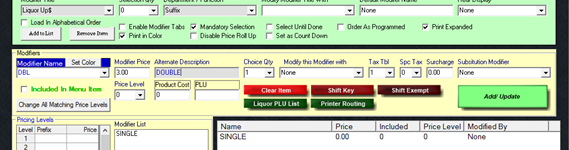
Starting in the Modifier Setup Screen –
- Create a modifier title
- Select Suffix in the Department/Function screen (or type in Suffix)
- If a choice must be selected, check Mandatory Selection
- Create a modifier name such as DBL
- You want to keep the name as short as possible, as this name will be added to the front/back of the menu item name on the customer’s check and in reports. The max number of characters for a receipt printer is 18 characters, so as the menu item name gets longer, the more letters will be cut off causing the new name to be confusing when looking through reports.
- You may choose to have an Alternate Description if you want the button name to appear differently than the name that will be shown on the receipts/reports.
- The Modifier Price will be the price difference – this number will be ADDED to the regular price.
-
Save when completed
- Assign this modifier group to the appropriate menu items, ensuring that this modifier group will prompt -leaving the Optional Modifier option Unchecked