
Typically you will have dedicated kitchen and bar printers for your items. By default, items entered in the system automatically print (or send) to their assigned printer(s).
In some scenarios. you may want to route items to a specific printer, depending on where you are in the restaurant. This is useful when a server is taking orders on a tablet on the patio and would like to send the orders to the "Patio" printer instead of the default printer across the building. With the following instructions, you can manually reroute a ticket to the printer of your choice.
[Summary]
This allows you to create a button that will allow the remote printer to be switched "on the fly" per order. The menu items will go to their normally designated printer by default unless you use the reroute button before tendering or touching "done" on the order.Setup:
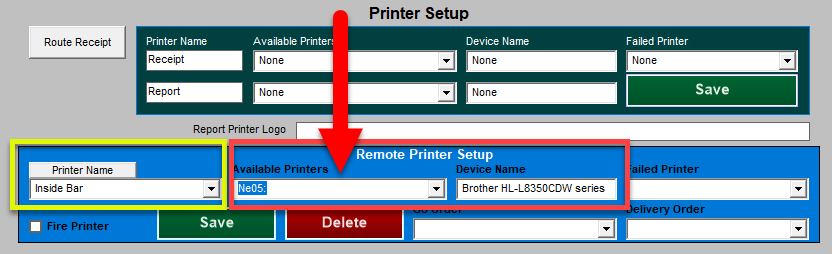
- In Windows, install both printers that will be the toggle choices for the remote printing. In this example, the MicroSale printer names, are "Inside Bar" and "Patio Bar".
- Go to Managers Menu > Register Setup > Terminal Configuration > Printer Setup
- Type in the printer name that will be assigned to menu items in MicroSale, this name should reflect the destination of the printer, such as "Inside Bar", "Kitchen", "Expo", etc.
- Select the dropdown next to your newly named printer and assign it to the actual Device Name that is installed in Windows.
- After your printer names are created and assigned, go to Managers Menu > Menu Maintenance > Menu Items and Pricing
- Create a menu item name with the same name as your printer name, such as Inside Bar.
- You can use button alias field (called Button Name) to provide a better description for the button. i.e. Send to the Inside Bar
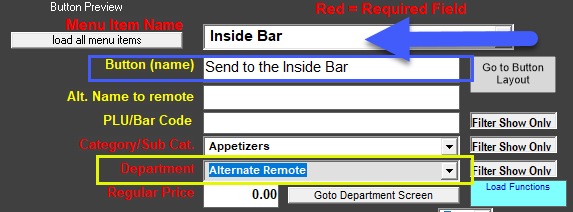
- Create the menu item in whatever category that you desire it to be in. Be sure to assign the menu item to the department "Alternate Remote".
- Save (you do not need to assign this item to a printer)
- After the menu item is created you will need to add the functions.ini to the MicroSale directory on each register in which you wish to use function. See below for an example of the .ini file as well. The other remote printer name (Inside Bar) would be put into the “Alternate Remote 1” field.
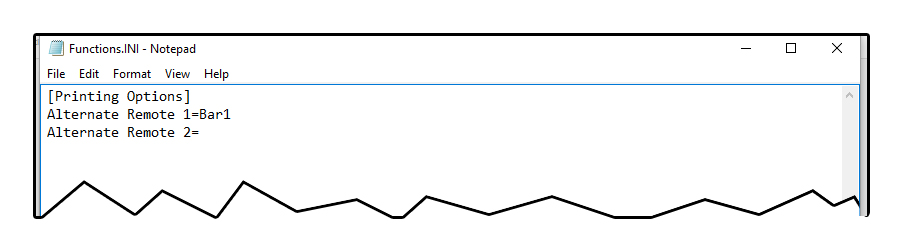
[Printing Options]
Alternate Remote 1=Inside Bar
Alternate Remote 2=