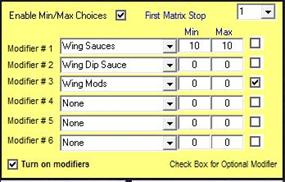
Min/Max is not necessary for 95% of menu items with modifiers.
If “Select until Done” is not checked in the modifier setup area, the user will be bumped out of the modifier screen after one modifier is selected. “Select Until Done” means the user can select as many modifiers as they want until actually selecting the word “Done”.
Min and Max is used for the following scenarios:
- Wing Countdowns
When enabling “Countdown”, MicroSale must use the Min/Max. Countdown enables a quantity bar at the bottom of the modifier screen to ‘count down’ the quantity until the maximum amount is met.
- Specific number of modifiers that must be selected
This is useful for sides or pizza toppings. Say you can get less than 3 toppings but you cannot exceed 3.
Enable Min/Max and set it to 0 and 3. Or, you want to have 2 side choices, and you cannot choose less than 2 or more than 2.
Min/Max is an ALL OR NOTHING function. If you turn it on, it will be used for all modifier groups connected to that specific menu item.
If a choice must be selected and you can only get one, put 1 in the min and 1 in the max. At 0 and 0, MicroSale interprets this as “Select Until Done”. The Min/Max function will always override what is programmed in the modifier setup (meaning, even if Select Until Done is unchecked (meaning only one choice is allowed) but the Min/Max is set to 0 and 0, Select Until Done will be enabled for that modifier group.