You can create a menu item that prompts a keyboard to type in a custom name and prompt a custom price. The open menu item is saved to a specific category, department and tax table for accounting purposes. While the user can fully customize the name and price, the item is set to specific remote printers so the item always routes to the proper station.
- Managers Menu > Menu Maintenance > Menu Items and Pricing
- Type in a menu item name (such as Open Liquor)
- You can either use this menu item name as the name of your item or you can prompt a keyboard to customize the menu item name on the fly.
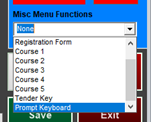
- To prompt a keyboard, select Prompt Keyboard from the dropdown under “Misc Menu Functions” on the bottom right of the screen
-
- Assign the item to the appropriate category and department
- Keep the regular price at $0.00
- Tick the checkbox next to “Make Menu Item Open Price”
- Use the default tax table (Sales Tax Table 1) or change to another table
- Enable Remote Printing and set the item to route to the correct printer
- Set modifiers if needed
- Save
- Add the menu item to a button