
Managers Menu > Inventory > Inventory Maintenance > Sub Recipes
Creating sub recipes is an optional step. Sub recipes are typically used for homemade sauces or dips that are used to further define items within a recipe.
Example: Restaurants that make their own guacamole. The guacamole is added to multiple menu items. The guacamole recipe itself is broken down into a sub recipe as avocado, tomato, pico, onion, etc.
Creating a sub recipe
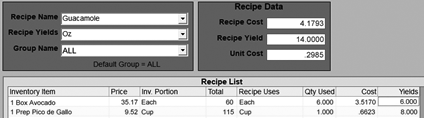
- Click the Sub Recipe tab on the tool bar
- Type in the name of your recipe; such as Guacamole
- In the Recipe Yields box, press the drop down and select the measurement of the serving size. The recipe's yield is number of servings that this recipe makes.
- Select items that have been already set up in your inventory list; click in the first field under Inventory List to populate saved items. The price, portion and total will populate automatically when clicking anywhere else in that row.
- Example, 60 Avocados come in a Case and it is broken down into an “Each”.
- The recipe uses 6 avocados, an avocado in this example is defined as an “Each”.
- In the column of Recipe Uses, press the drop down and select “Each”.
- Example, 60 Avocados come in a Case and it is broken down into an “Each”.
- In the QTY Used, type in 6 and press Enter or click out of the box. The Cost and Yield automatically calculates based on the entered data.
- For the guacamole example, the Recipe Data section calculated that guacamole costs $4.17 to make and it yields 14 ounces. The unit cost is .29 cents.