
Within the Access Phone Orders screen you can select the option “Change Order / Customer Information”. This will launch the Customer Information screen. From here you can make adjustments to the address, date/time, pay a deposit, etc.
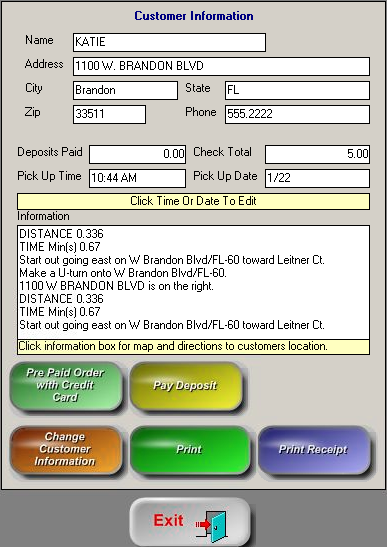 |
Only the Address, City, State, Zip, and Phone fields can be edited on open orders. Only the Pick Up Time and Pick Up Date can be modified from this section. |
|
Pre Paid Order with Credit Card This will allow you to take a customer’s card ahead of time. For example, maybe they are sending their child into the restaurant to pick up the order and they do not have the payment. |
|
|
Change Customer Information Saves the information you changed |
|
|
This will print the “Driver Instruction Data” which does not include what was ordered but instead includes: Customer Name, Address, City, State, Zip, Phone and Drive Instructions including the distance and minutes. |
|
|
Pay Deposit
|
|
|
Print receipt This will print the customer’s itemized receipt that may also include drive directions. |