
- Select Driver Sales Report
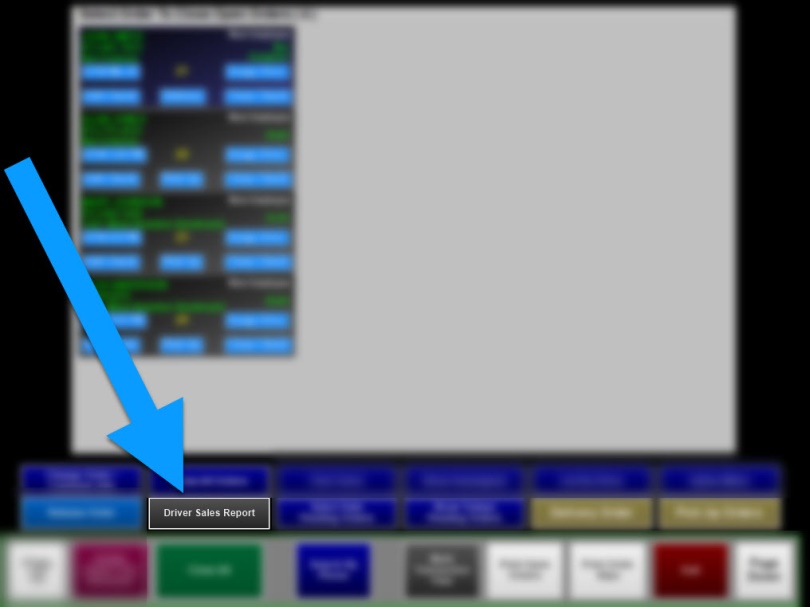
- Select the Driver’s Name
- The Driver Report can be viewed on screen or printed.
- If open orders are set to $0.00 and all tips are entered, select Print Report, staple the credit card slips to the driver report and collect the Net Cash Due
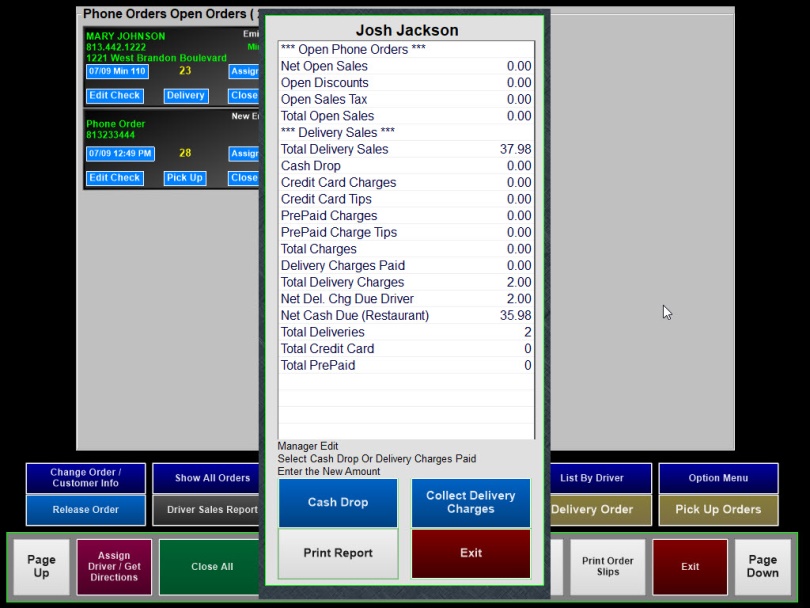
Note: The report provides total driver sales, credit card sales and tips. Tips are deducted from cash. If delivery charges are used, that will add that total as well as any cash drops from the driver. More details below.Term
Description
Net Open Sales
Orders that have not been closed and are still waiting to be delivered
Open Discounts
Total discounts applied to undelivered orders
Open Sales Tax
Total tax of undelivered orders
Total Open Sales
Total sales of undelivered orders
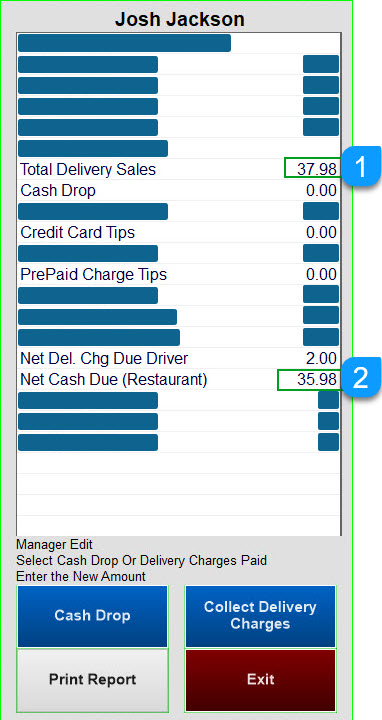
Total Delivery Sales
Total sales of delivered orders (not including tips)
“Total Delivery Sales” will only be visible on the Driver Report when the Total Open Sales is $0.00.
If it is not at $0.00, Total Delivery Sales is replaced with “Net Open Sales” and “Total Sales Open & Closed”
Cash Drop
Any cash drop (skim/deposit) that was performed during the day for the driver
Credit Card Charges
Total check amount charged to credit cards (excludes charged tips)
Credit Cards Tips
Total tips that have been charged to credit card transactions
Total Charges
Credit Card Tips + Credit Card Charges
Total Delivery Charges
Total delivery fee charges
Net Del. Chg Due Driver
Total delivery charges the store owes to the driver (this amount is either a flat dollar amount or percentage of the delivery fee collected). If this is not setup, please refer to Setting Up Delivery Fees, Driver Payment Amount
Net Cash Due (Restaurant)
Total cash amount that the driver owes to the restaurant
Understanding the amount owed to the restaurant
|
|
Total Delivery Sales - Cash Drop (skimming the driver of excessive cash during the shift) - Credit Card Tips - PrePaid Charge Tips - Net Del. Chg Due Driver = Net Cash Due (Restaurant) |
If a driver wants to collect their portion of the delivery fee prior to end of shift
|
Collect Delivery Charges This option is used to pay the driver their delivery payment before their shift is over. Example, the driver is on break and wants to collect the delivery fee payment early to buy lunch. Select Collect Delivery Charges and type in the amount from Net Del. Charge Due Driver; the system will enter this as a paid out for the inputted amount The amount from the Net Del. Chg Due Driver moves it to the Delivery Charges Paid field
|
|
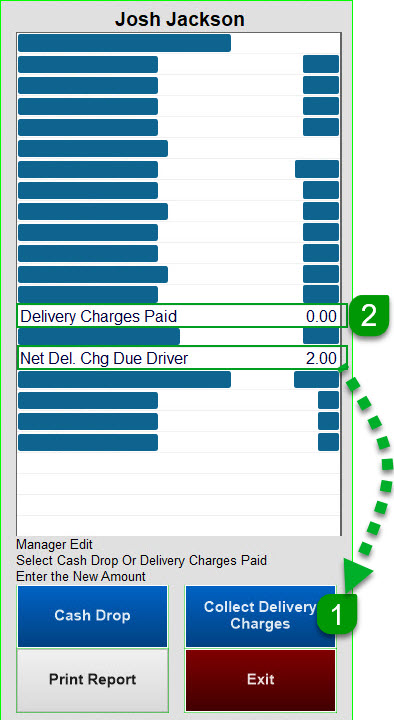 |
Delivery Charges Paid |
|
This is the amount of the delivery fees paid to driver. This is typically displayed at $0.00 unless the driver wants their cut of the delivery fee before their shift is over. This number is affected by the Collect Delivery Charges button (works as a paid-out to balance the driver’s sales) |
|
|
Net Del. Chg Due Driver |
|
|
This is the amount of the delivery fees that the store owes to the driver (this amount is either a flat dollar amount or percentage of the delivery fee collected). If this is not setup, please refer to Setting Up Delivery Fees |
|