**CANADA ONLY**
"Provincial sales tax (PST) is a retail sales tax that applies when a taxable good or service is purchased, acquired or brought into B.C., unless a specific exemption applies."
Creating PST Rules
- Go to Managers Menu > Register Setup > Sales Tax Menu
- Select PST Tax Rules and select all departments that apply to PST
- Set the exceptions for PST using the Special Tax area.
- In the Special Tax setup area, type in "Dine In" (or another name) and the same tax rate as your regular state tax. Hint: the "Dine In" label will appear on customer receipts for on premises eating and appear as Tax Exempt when the order is to go.
- Set the Min Tax $ to .01 and Max Tax $ to 9999.99
- In the tax exception area, select the dropdown and choose the appropriate exemption. For Ohio, choose Go Order/Drive Thru/Phone Order
- When finished, select Save (upper left side of screen)
Assigning Menu items to the PST exception tax table
- Now go to Managers Menu > Menu Maintenance > Menu Items and Pricing
- Choose a menu item from the dropdown menu
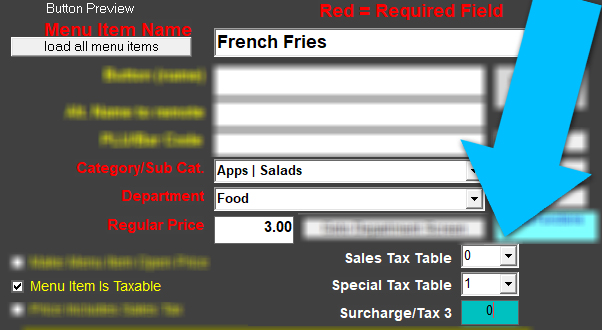
- If this menu item follows the "exception rule" where the item may be taxed or not taxed, depending on the order type (dine in taxed, to go not taxed), set the "sales tax table" to 0 and "special tax table" to 1.