
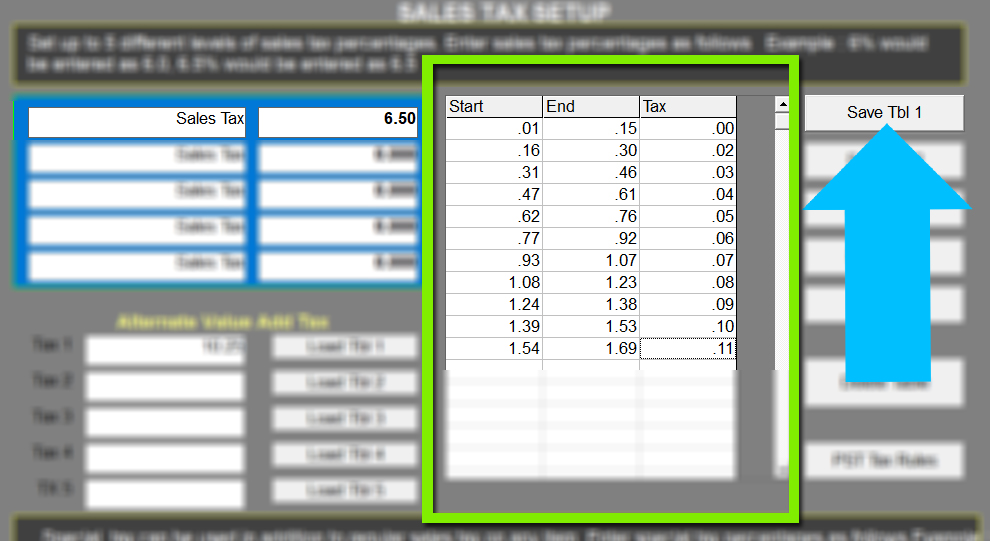
While setting up one basic sales tax rate is typically acceptable, you can set your system to more accurately calculate sales tax with a tax chart. The tax chart is provided by your local department of revenue. A tax chart is helpful for rounding up or down, depending on your governments standards. In the example below, the regular sales tax is set at 6.5%.
**The following information is an example (using Ohio Tax information)** If you are going to set up taxes using the chart, you must get the information from your local department of revenue.
The chart is useful to properly round numbers. The table below shows when the chart is more accurate than typical rounding;
| USING REGULAR TAX RATE | -- | -- |
| Menu Item Price | Tax | Total |
| $8.47 (x6.5%) | .55055 (true amount) | 9.02055 (true amount) |
| Using standard calculations | $.55 (rounds down) | Total $9.02 in POS |
| USING CHART | -- | -- |
| $8.47 ($8.00 x6.5%)+($.47=$.04) |
($.52 + $.04)= $.56 |
Total $9.03 in POS |
| in the example below, $.47 equals a tax amount of $.04 |
Setup:
- Request a tax threshold chart from your local department of revenue
- In MicroSale, go to Managers Menu > Register Setup > Tax Rate Setup
- To use the provided chart with the standard sales tax rate, type in the threshold amounts in the grid and then select Save Tbl 1. You only need to complete the first 10 lines; MicroSale will automatically understand and apply calculations using the sequence of the first 10 rows.
- Select Save again in the upper left area of the screen and Exit.